


xTweet: Tweeting from within XBMC Media Center
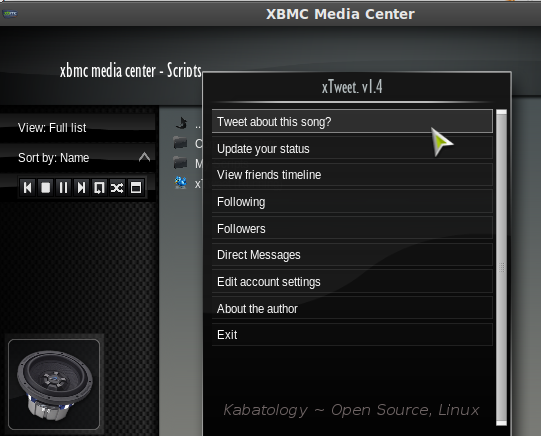
The title of the post should be “trying to tweet from within XBMC with xTweet”. xTweet is an extension script for XBMC Media Center that transforms XBMC into full-featured Twitter desktop client with specific features like; Tweeting about the a song or vclasseo you’re playing. As shown in the screenshot xTweet also packs those features you’ll find in other Twitter desktop clients like TweetDeck.
This how xTweet updates your Twitter Status when you hit “Tweet about this Song?”

Its certainly not the best Twitter desktop client for Linux I’ve come across, but for those who use this extensible media centre as their default media center to watch movies say apple movie trailers and so on, xTweet is just a welcomed extra.
Manually install xTweet in Linux Ubuntu: Download the script, extract it and place it in the ~/.xbmc/scripts directory.
To manually install xTweet in Windows XP: Download the script, extract it and place it in C:\Documents and Settings\[username]\Application Data\XBMC\scripts\ folder
In Vista and Windows 7 place it in
C:\Users\[username]\AppData\Roaming\XBMC\scripts\ folder
Now run XBMC, then Scripts -> xTweet. Hit xTweet and login with your Twitter account.
xTweet is not yet at its best, it a bit bumpy, you might have to re-login several times into your Twitter account, but with Twitter Search coming soon, its worth a try.
Download xTweet Extension Script for XBMC Media Center
6:47 pm on August 20th, 2009
http://bit.ly/yWxEt xTweet: Tweeting from within XBMC | Kabatology ~ Open Source, Linux http://bit.ly/3ug1A0
5:35 pm on October 9th, 2009
I wish it had an auto-tweet, so I don’t have to go through the script menu everytime I want it to tweet about what I’m doing. And if I do have to go through that menu, at least allow me to add to what it’s tweeting (ie, watching Extreme Movie on #XBMC Media Center… and regreting every minute of it). Even better than auto-tweet, just let me choose it from the sub-menu of the MPlayer.