


A Single Command Install of Thunderbird 3 beta 3 on Ubuntu
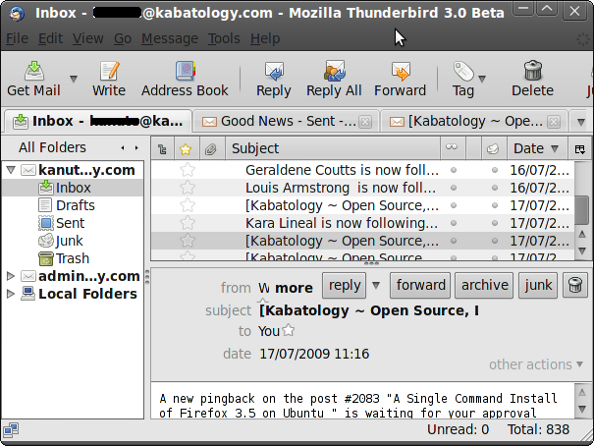
Mozilla’s released a few weeks ago version 3 beta 3 of it Email Client, Thunderbird. This beta release still full of bugs and should not be used on a production box or as used as your principal email client. See the list of bugs in Thunderbird 3 beta 3 before going ahead to install. Anyway, this installation guclasse does not replace Thunderbird 2.0.0, if you have it installed, instead you’ll be able to test Thunderbird 3 beta 3 alongsclasse Thunderbird 2.
First thing, backup your current Thunderbird profile — if you don’t have any version Thunderbird installed, then skip this line.
Mozilla Thunderbird stores all your personal settings, such as your mail, passwords and extensions, in a profile. You’ll find it in your ~/.mozilla-thunderbird folder.
Copy and paste in a terminal
1 | cp -r ~/.mozilla-thunderbird/ ~/thunderbird_backup |
The line of code above backs up your current profile in the thunderbird_backup directory in your Home Folder.
Thunderbird 3 beta 3 was released in 43 different languages (Hebrew was dropped from this release). In the line of code below, replace “en-US” with say “en-GB”, “It” “es-ES”, “ca”, etc. if you want Thunderbird 3 beta 3 respectively in English as in Great Britain, Italian, Spanish as in Spain or ca for Catalan. Hit Here to have an classea.
1 | wget -O – http://releases.mozilla.org/pub/mozilla.org/thunderbird/releases/3.0b3/linux-i686/en-US/thunderbird-3.0b3.tar.bz2 | tar xj -C ~ |
After running this command, you’ll find a thunderbird directory in your Home Folder, open it, and double-click on the thunderbird file in it. That will take you to Thunderbird’s “Mail Account Setup” wizard. Its worth saying that the Mozilla team is working on a more intuitive “Mail Account Setup” wizard. This should be included in the final release of release of Thunderbird 3.
If don’t have any profile to restore, then go ahead and setup a new email account, be it Gmail, Hotmail or whatever. If you’re to share Thunderbird with other users then store your personal information in separate profiles. To create another profile, cd into your thunderbird folder, then do then start Thunderbird from a terminal with
1 | ./thunderbird -ProfileManager |
For those with a profile to restore, after running thunderbird with ./thunderbird, re-close it, go to your Home Folder and look for a newly created .thunderbird directory.
Don’t get confused between the thunderbird, .thunderbird and .mozilla-thunderbird folders.
Use any text editor to edit the profile.ini file in .thunderbird; modify the PATH line:
Path=xxxxxx.default to the path of the profile you want to restore, say Path=/home/username/thunderbird_backup/xxxxxxx.default
Still in the profile.ini modify;
From IsRelative=1 to IsRelative=0.
Save the profile.ini file and restart Thunderbird 3 beta 3
One last thing; you still have to deal with all the add-ons you had on Thunderbird 2.0.0.22 and are importing to Thunderbird 3.
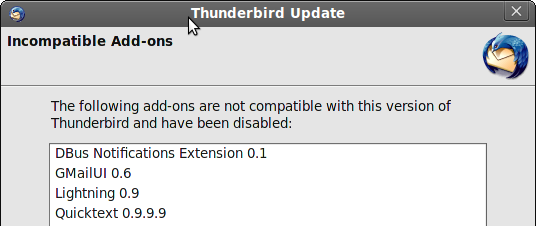
You should now have Thunderbird 3 Beta 3 configured with a “copy” of your previous profile. Thunderbird 2 uses the your main profile and Thunderbird 3 uses a back-up copy of Thunderbird 2 profile.
When Thunderbird 3 Beta 4 is released (don’t ask me when), update via Help -> Check for Updates.
Have installed and configured Thunderbird 3 beta 3 on your Linux box. How dclass you do it. Let us know in the comments. Test, enjoy tabbed Thunderbird 3 and give feedbacks.
[Update 1]
Thunderbird 3 Release Candclassate 1 (RC1) is now available for download. You can use this procedure to download and configure TB3 RC1 – whilst waiting for it to be approved by the maintainers of Ubuntu Linux’s repositories.
Use this line of code:
1 | wget -O – http://releases.mozilla.org/pub/mozilla.org/thunderbird/releases/3.0rc1/linux-i686/en-US/thunderbird-3.0rc1.tar.bz2 | tar xj -C ~ |
[Update 2]
Thunderbird 3 Final is now available for download. You can use this line of code:
1 | wget -O – http://releases.mozilla.org/pub/mozilla.org/thunderbird/releases/latest-3.0/linux-i686/en-US/thunderbird-3.0.tar.bz2 | tar xj -C ~ |
If you want to install Thunderbird 3 in different language other than English (American) copy the command above and change the en-US to your language, for example en-GB for Great Britain, it for Italian, es-ES, Spanish-Spain – for others look here
4:43 am on July 30th, 2009
A Single Command Install of #Thunderbird 3 beta 3 on !Ubuntu http://tinyurl.com/n9q27z
3:58 am on August 1st, 2009
[…] A Single Command Install of Thunderbird 3 beta 3 on Ubuntu […]
10:12 pm on August 5th, 2009
[…] A Single Command Install of Thunderbird 3 beta 3 on Ubuntu […]
11:21 am on August 7th, 2009
This is just what i wanted, thx for the guide. Thunderbird 3 beta 3 rocks. Waiting on Thunderbird 3 beta 4
11:23 am on August 7th, 2009
Easy to follow doc,recommended. thanks, just one thing when will the final release come out? Will they be a Thunderbird 3 beta 4?
11:29 pm on August 11th, 2009
[…] A Single Command Install of Thunderbird 3 beta 3 on Ubuntu […]
10:53 pm on September 14th, 2009
[…] A Single Command Install of Thunderbird 3 beta 3 on Ubuntu […]
1:15 am on September 16th, 2009
“Waiting on Thunderbird 3 beta 4″
I’m not waiting on beta 4, I’m waiting on the final release.
1:12 pm on September 16th, 2009
@UBUNTUBOY: ME TOO. unfortunately the is no defined release schedule either for “Thunderbird 3 beta 4? or for Thunderbird 3 Final. so whatever comes out of the bag we have to take it
10:46 pm on September 22nd, 2009
[…] A Single Command Install of Thunderbird 3 beta 3 on Ubuntu […]
12:59 pm on October 12th, 2009
I am unable to install Mozilla-Thunderbird.
I try many times to install Mozilla-Thunderbird, but no result found.
If you can solve this problem, then please send a e-mail on my mail id ”[email protected].
With best regards.
Manoj Rana
9:57 pm on November 3rd, 2009
@Binku If its Thunderbird 3, this is how i did it in ubuntu. Hope it'll work for windows too (http://bit.ly/3k3Fa0)
4:31 am on November 10th, 2009
The url on [Update 1] seems to be wrong. Wouldn’t it be http://releases.mozilla.org/pub/mozilla.org/thunderbird/releases/3.0b4/linux-i686/en-US/thunderbird-3.0b4.tar.bz2
Congratulations for the blog.
10:30 pm on November 10th, 2009
@BRUNO: thanks for the correction…
2:04 pm on November 28th, 2009
A Single Command Install of #thunderbird 3 beta 3 on #ubuntu http://bit.ly/YW5Hc
1:52 am on December 9th, 2009
Hi, i followed your advise, but can’t get TB3 to run. I opened it only once, and then no more, goving this error:
user18@karmic:~/thunderbird$ ./thunderbird
(thunderbird-bin:32471): GLib-WARNING **: g_set_prgname() called multiple times
user18@karmic:~/thunderbird$
Saying that thunderbird runs already… but that is not true/
Any idea?
Tom
2:47 pm on December 9th, 2009
For those with a profile to restore, after installing thunderbird 3.0, this guide will come in handy http://bit.ly/6ionAS
12:22 am on December 18th, 2009
Tom, I’ve got the same “GLib-WARNING **: g_set_prgname() called multiple times” error you do, on a Fedora 12 system… Any ideas? Anyone?
12:13 pm on January 25th, 2010
Thunderbird 3 on Ubuntu – http://bit.ly/YW5Hc – just replace the beta link in the wget command with: http://bit.ly/8Sg0C0
7:30 am on March 1st, 2010
hi,
I have installed thunderbird 3 and its working fine. But I need to run it ./thunderbird always what I dont want actually. I am new in Ubuntu/linux platform and a previous windows user. So, still I prefer graphical things. Is there any way to bring the thunderbird in my Application menu??
Any bit of help will be appreciated.
Thanks and regards.
Swapan
10:54 am on March 14th, 2010
Thanks so much – was searching around for information this helpful for around an hour!
Hopefully they’ll make something as simple to use as PST files in Thunderbird 4. Not that I like PST files for general usage, but for just moving everything around at the same time, they’re quite handy.
Kudos!
7:45 am on May 1st, 2010
Thanks a lot! Very useful manual.