


gWallpapers rotates your Wallpapers in a given Time Interval
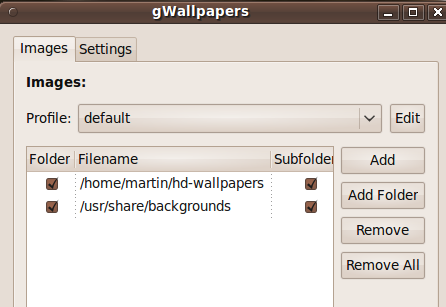
Linux: gWallpaper is a tiny application that takes wallpapers in various local folders in your Linux PC and automatically rotates them – and that’s it.
To install in Ubuntu 9.10, add the gWallpapers repository to your software sources list: sudo add-apt-repository ppa:haliner/ppa, update and install with sudo apt-get install gwallpapers . Application -> Accessories -> gWallpapers to run, or Alt+F2 -> gwallpapers.
Setting up consists of selecting your wallpaper folders, choosing a time interval (in minutes) to rotate your backgrounds and launching the daemon. You can also add it to your ‘Startup Applications’. Searching for wallpapers? 150 HD WallPapers for Wclasse Screens – or grab National Geographic Wallpapers
gWallpapers is a free and open source application for Gnome and Xfce desktop environments like Ubuntu.
6:38 pm on January 6th, 2010
gWallpapers rotates your Wallpapers in a given Time Interval http://bit.ly/8Em9wM
10:17 am on January 7th, 2010
You should check out Wally. It has alot more options, including showing pictures from social picture sites like flikr, photobucket etc.
3:13 am on January 8th, 2010
I setup my mom’s new laptop (a 5-6 yr old Celeron for 170$) with Mandriva and she wants the wallpaper setup the way dad has his Kubuntu desktop:
There are 4 different desktops:
one has a picture of her grandsons,
one has that interactive globe,
one has a wallpaper rotation of beautiful KDE wallpapers we DLed that changes every hour and one is a rotation of recent pictures, usually the previous month, which updates every 15mins.
Im not a wallpaper guy but many, many people just love to be able to have updatable wallpapers.
Whenever I see people with their default one whether on Mac or Win, I wonder if they really like it or if they dont know they can change.
2:01 pm on January 8th, 2010
@Ned Flanders (Simpsons): guess what I rotate my wallpapers every 5mins, aha.