
Archive for the ‘Audio_Visual(MP3)’ Category
Mythbuntu, the Windows Media Centre alternative
Mythbuntu, the Windows Media Centre alternative is an Ubuntu based Linux distribution that is dedicated to media. You can watch videos and record live TV (with the help of a TV tuner), listen to music, or browse pictures. It is simply an all-in-one PC and entertainment centre.
Mythbuntu is practically the core of Ubuntu without all the extra applications included in Ubuntu. It ships with the XFCE4 lightweight desktop, that can be easily replaced at any time with one of the Buntus desktop (Ubuntu,Kubuntu or Xubuntu) using the Mythbuntu Control Centre.
Mythbuntu is recognized as a community supported project by Canonical, it’s development cycle closely follows that of Ubuntu, thus, it is released every six months shortly after Ubuntu releases. The final release, Mythbuntu 7.10, is now downloadable as an .ISO that burns into a LiveCD.
So you can verify hardware compatibility before installing it. The LiveCD works as a MythTV front-end.
Screen Recording in Linux; Is it possible?
Xvidcap; The most classic screen recorder for Linux. Xvidcap records both video and audio. It uses the ffmeg tool for video recording while the audio is taken from the system’s interface(need a working microphone).
(more…)
JackLab Audio Distribution 1.0 for media creators
Linux media lovers have always desired a distribution like JAD – Jacklab Audio Distribution. Now it is out. JAD 1.0 contains a full production environment for media production, primarily music but not only, video and imaging also.
JAD is based on the stable openSUSE 10.2 which uses a real time kernel suitable for multimedia applications and software. (more…)
Audacity removes vocals from mp3
| If you’re interested in transforming you’re favourite mp3 songs into a ringtone for your cell phone or newly hacked iPhone then make use of this video provided by video maker Jimmycron. Using the Open Source sound editor Audacity, Jimmycron explicitly explains how to get rid of vocals on Mp3 tracks, that then become instrumentals. Could also be an easy way to make a Karaoke. |
RealPlayer for Linux
 With RealPlayer you can listen to streaming music from internet radios around the world. Install Real Player from Canonical’s Commercial Repositories (6.06 LTS Dapper only). Add Canonical’s Commercial Repositories to your apt/etc/sources.list
deb http://archive.canonical.com/ubuntu dapper-commercial main
(more…)
GStreamer for Ubuntu,Debian Mp3
Gnu/Linux Ubuntu does not riproduce MP3 files, this means you’ve got to install it yourself, if not you would not be able to play you’re mp3 files. Ubuntu simply wants to avoid legal problems in countries where mp3 licence is needed. In the “Synaptic Package Manager” in System/Administration move over to “Settings” then “Repositories”. On the “Ubuntu Software” flap choose all the servers you want to use to download packages. Make sure you select the voices “universe†e/o “multiverseâ€. Then “Closeâ€.
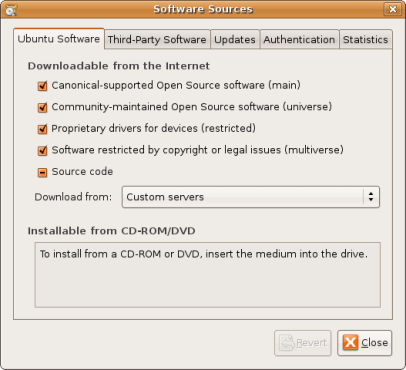
In the Synaptic Package Manager click on “Search†and write down gstreamer0.8-mad package, Then click Search to start searching on the web. At the end of the search select the package and click “Applyâ€. You’re done.
