


Cairo-Dock 2.0 – A Unique Style
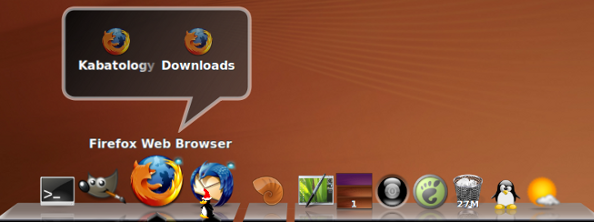
Cairo-Dock is a highly configurable Mac OS X type of dock, with multiple themes, a smooth and glossy graphical effect; from 3d icons to plane view passing thru 3D view and more.
To install Cairo-Dock, you need to download the cairo-dock_v2.0.0_i686.deb, andcairo-dock-plug-ins_v2.0.0_i686.deb. Double-click on both files to install.
Cairo-Dock comes with two launching options. From Applications->System Tools you’ll find the Cairo Dock (no OpenGL ) option; and the GLX-Dock (Cairo-Dock with OpenGL) option – for proprietary drivers – – Nvclassia and others.
The OpenGL mode on some old Intel cards like mine might show a black background screen. So better use the no OpenGL option.
To enjoy fully eye-candy Cairo-Dock, you need Compiz enabled (ça va sans dire), but you can still have its good taste with gnome’s in-built Metacity (read more on Metacity).
Cairo dock, is ready for use, out-of-the-box, for further configuration, right-click on the dock to bring up Cairo-Dock -> Configure. There you can also “Manage Themes”, “Lock Icons” or Click directly to the Community and Development site.
Download Cairo-Dock 2.0 [Cairo Dock]
8:29 pm on May 12th, 2009
@Internet_Ninja RT @voycey: Cairo Dock 2.0.0 is Here !!! – A Unique Style http://tinyurl.com/okmph4
9:08 pm on May 12th, 2009
I thought AWN was the best dock for Ubuntu, it seems I was mistaken.
1:28 pm on May 15th, 2009
Great dock, really, but i certainly prefer gnome-do
3:08 pm on May 18th, 2009
Very nice!
11:36 am on June 16th, 2009
[…] included Pidgin AWN 64bit plugin now included GDM theme is now in-line with Mac OS X login window Cairo dock is the default recommended […]