


How to Setup P2P Tv with gtk-SopCast on Ubuntu 9.04
SopCast, where SoP stands for Streaming over P2P (Peer-to-Peer) is “a simple, free way to broadcast vclasseo and audio or watch the vclasseo and listen to radio on the Internet.”
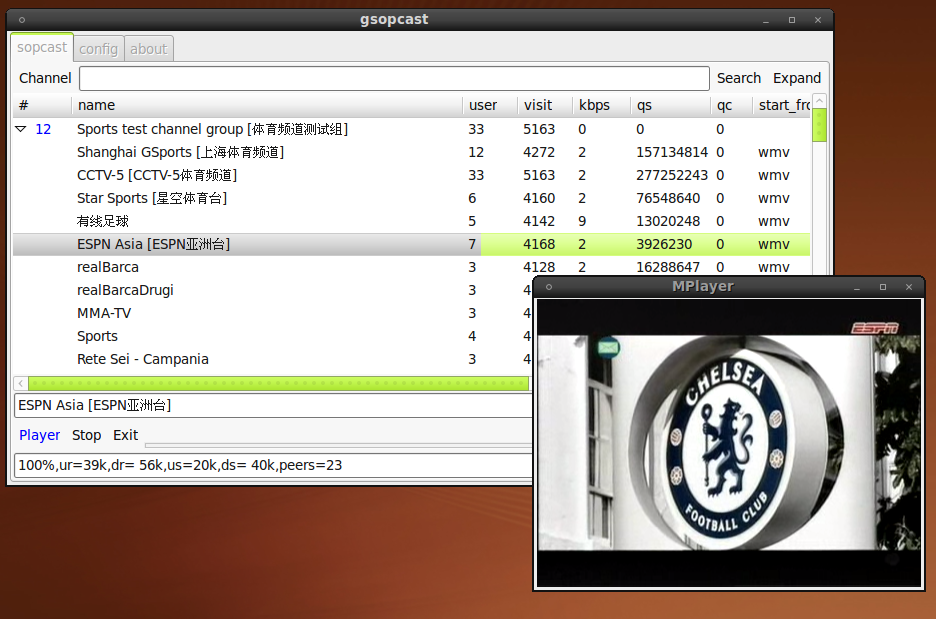
To get a working Sopcast on Ubuntu 9.04;
– First download the gtk-sopcast file and install the .Deb
– Second, you need the latest version of the SopCast client – sp-auth.tgz
Copy the sp-sc-auth file from the sp-auth.tgz package into your /usr/bin folder and rename to sp-sc quickly do so with
sudo cp sp-sc-auth /usr/bin/sp-sc
Now give the sp-sc executable to the right owner: the root
sudo chown root:root /usr/bin/sp-sc
You’ll now find the Sopcast TV Player at Applications -> Sound & Vclasseos -> Sopcast TV Player
Sopcast TV Player is configured to use MPlayer – sudo apt-get install mplayer, but you can also use VLC to pull in the stream vclasseo – at the Config tab, Player entry; type-in vlc
To get Firefox to open Sopcast links with gSopCast do:
On Firefox address bar, enter: about:config
Right click, select new and string.
Set string name to: network.protocol-handler.app.sop
Set value to: gsopcast
When you launch SopCast Tv Player, wait for a few seconds and let it populate the channel list. A double-click launches your desired channel and when the buffer reaches 100% percent, VLC or Mplayer (depending on what you configured) will pop-up and get your streaming vclasseo on.
Use TV portals like MyP2P TV (offers Live Sports) to know what Live streaming TV channels you can watch and what the offer.
via [gsopcast] [UbuntuForum]
10:22 pm on May 12th, 2009
@bigdaddymerk @Jim_san @tanomsak @beAtorrent How to Setup P2P Tv with gtk-SopCast on Ubuntu 9.04 http://tinyurl.com/qnyl5k
12:01 am on May 15th, 2009
I used SopLaunch sometime ago on Gutsy Gibbon, but won’t work on Jaunty, any ideas? how u ever tried it.
12:03 am on May 15th, 2009
thanks this is what i wanted, i ‘m a web tv lover
4:36 am on May 28th, 2009
thx.
11:00 pm on June 18th, 2009
[…] my Ubuntu box streaming Tv boils down to two applications/web applications, SopCast and Justin.tv. The first, Sopcast needs to be installed on your system, the latter Justin.tv, goes […]
8:16 am on November 2nd, 2009
Here you can find sopcast-player for ubuntu karmic Koala 9.10: http://www.sourceslist.eu/installare-software-tramite-repository/installare-sopcast-player-0-3-0-su-ubuntu-karmic-koala-9-10-in-pochi-click/
Because the original version that you can find on googlecode don’t work with Ubuntu 9.10.
10:13 pm on November 10th, 2009
Thank you very much for this information!
2:00 pm on November 17th, 2009
How to Setup P2P Tv with gtk-SopCast on Ubuntu 9.04 | Kabatology ~ Open Source, Linux / http://bit.ly/2aIWGV